Welcome to our October product release announcement! Each month, we round up the latest product enhancements and what they mean for your team and the families you serve. Missed our last edition? Read the September update to catch up.
Enrollment season is busy for everyone. Families are juggling forms and deadlines, and your team is fielding the questions that come with them. This month’s updates make the enrollment journey easier for both, by clearing up the small points of confusion that slow everyone down:
- For admins: A faster way to build and test forms before they go live
- For families: An easier path from finding the right program for their child to finishing their application, so fewer families drop off along the way
- For schools, districts, and charters: Follow up with interested families sooner, and turn more SchoolFinder® visits into applications
Build and Test Forms With Confidence
Forms are the backbone of enrollment, and a broken branch in your conditional logic can stop a family cold. Until now, the only way to check your work was to log in to a test guardian account and click through every step.
Form Step Preview: See What Families See Before You Publish
With Form Step Preview in SchoolMint Enroll Premium, admins can preview any form step right from the form builder. Click the preview icon on a step to open it in a window, then interact with it to check the layout and test conditional logic and field toggles, without leaving the editor.
- Check layouts and branching logic in real time as you build
- Catch broken logic before families ever see it
- Get new forms set up and live in less time
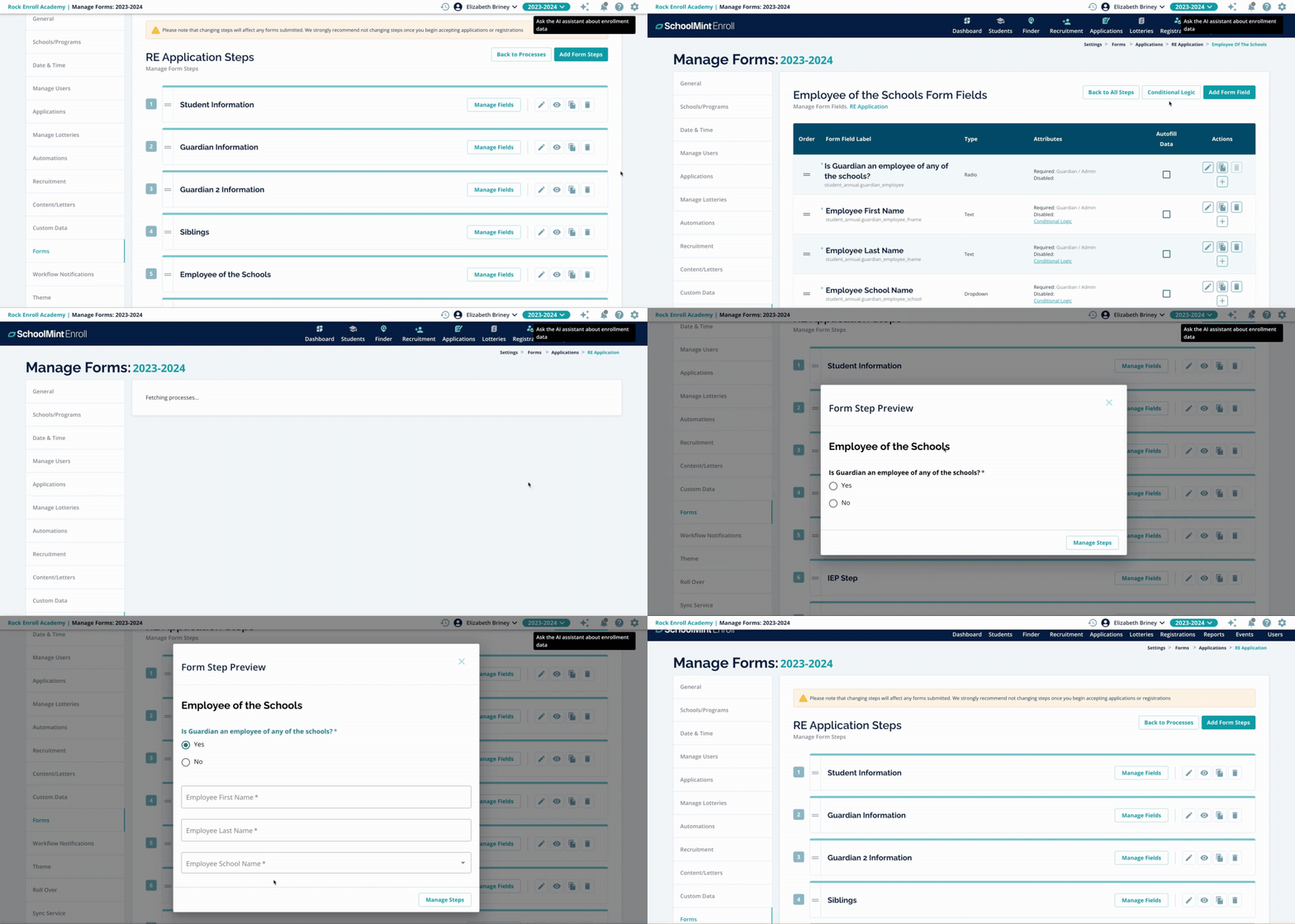
Above: Testing conditional logic with Form Step Preview.
Help Families Find and Connect With the Right School in SchoolFinder
Families don’t just choose a school. They choose a program: dual language, STEM, Montessori, and more. SchoolFinder now shows seat availability for each program at a school. Families see it on school cards, school profiles, compare views, and filters. Schools with two or more programs get a “Seat Availability by Program” breakdown.
Your team stays in control of the message. You can show an exact number, show a range, or hide seat counts entirely. We also heard that a red “no seats” message can discourage families from applying, so you can now turn it off. Families will see “limited seats” instead.
- Families see which programs have open seats, not just the school overall
- Families make confident choices based on accurate, program-level information
- Your team decides how availability is displayed

Above: Program-level seat availability on a SchoolFinder school profile.
Address-Free Search: School Search for Every Family
Every family should be able to explore their options, including families who don’t have a stable address. With Address-Free Search, families can find schools in SchoolFinder just by choosing a grade level. They’ll see every school that serves their child’s grade, without entering an address.
- Let families see every school serving their child’s grade with a simple grade-level search
- Support families who are moving or unhoused
- Support your organization’s equity goals

Above: Searching SchoolFinder by grade level, no address required.
Guardian Dashboard: A Clear Place to Start Every Form
We heard that families were confused by the small plus icon on the guardian dashboard and weren’t sure how to start another form. So we streamlined the dashboard to cut the clutter, and replaced that icon with a clearly labeled Add Form button.
Families know exactly where to start a new form, with no guessing what an icon means and fewer families drop off before finishing their submission.

Above: The redesigned guardian dashboard, with the new Add Form button.
SchoolFinder + SchoolMint Recruitment: Capture Families When They’re Most Ready to Act
The moment a family finds a school they like is the best moment to follow up. For a school using SchoolMint Recruitment, its school profile in SchoolFinder has an I’m Interested button*. When a family submits their interest, it shows up as a lead in your SchoolMint Recruitment dashboard right away, with no manual handoff.
- Give families a clear next step on every school profile
- See new leads in your Recruitment dashboard with no exports or re-entry
- Move families from discovery to enrollment in one connected system
* Requires SchoolMint Recruitment subscription.
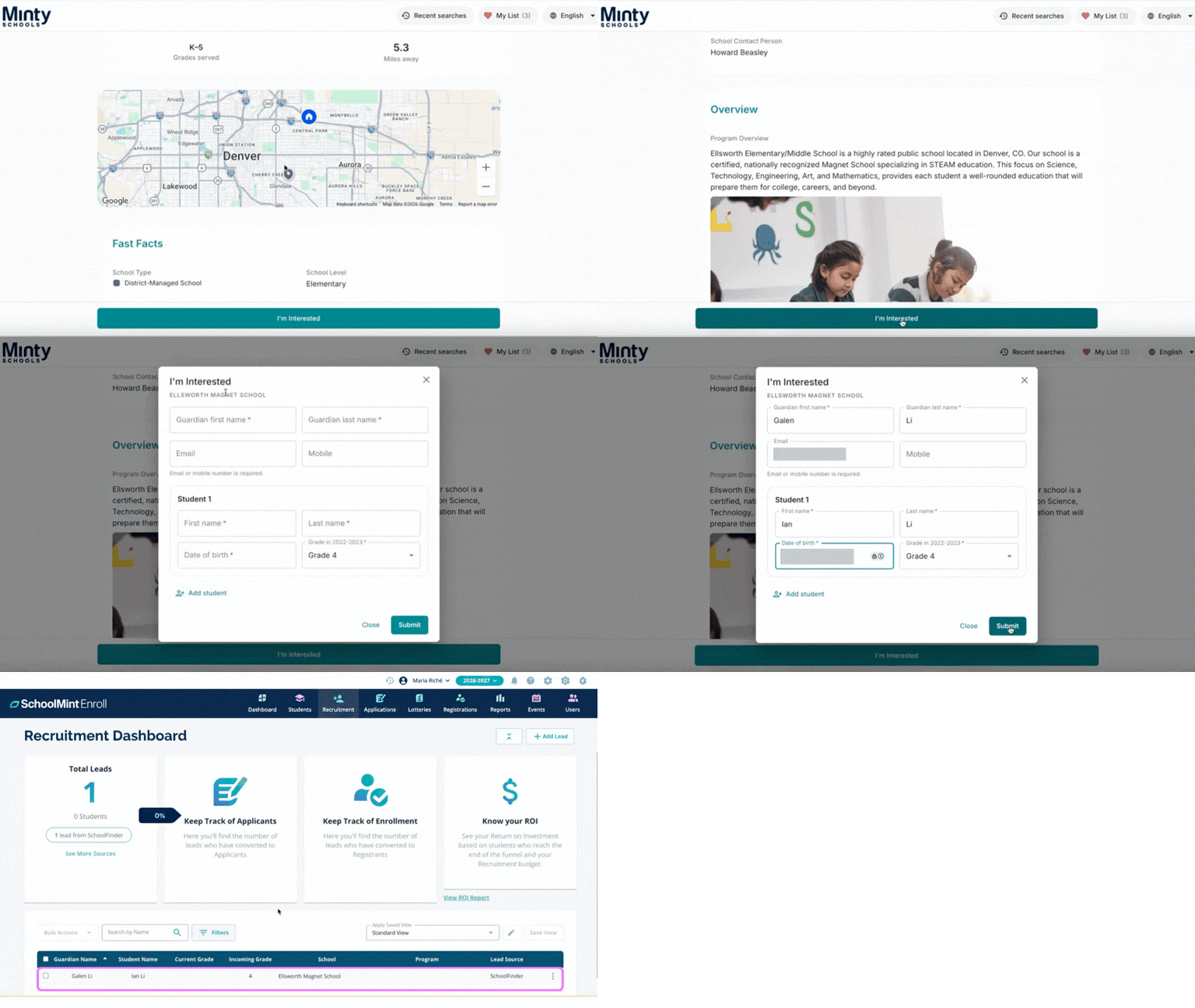
Above: Families submit interest right from a school’s profile in SchoolFinder.
An Easier Journey From Start to Finish
Every update this month has the same goal: make each step of enrollment easier for the families completing it and the staff supporting it. Forms you can test before they go live, seat information families can act on, a school search that works without an address, clearer guardian dashboard, and a one-click way to raise their hand means more families finish what they start, and fewer of them need to call your office to get there.
Enrollment Growth Starts Here
Want to see these capabilities in action?
Already using SchoolMint? Contact your SchoolMint representative to learn more about availability for your organization and how to begin using these capabilities.
Exploring SchoolMint? Request a demo to see how the SchoolMint Enrollment Growth Platform can help your organization attract, engage, and enroll students while making the enrollment journey easier for families.
Request a Demo From Interest to Enrollment: Evaluating K-12 Recruitment Software